Short answer: yes, your Garmin works with a Mac. Garmin devices connect over USB, Garmin Connect runs in any browser and on your iPhone, and GPX files open everywhere. Where Mac users run into trouble is Garmin's own desktop software, which was built for Intel Macs and now depends on Apple's Rosetta translation layer.
Here's what actually works on a Mac in 2026, especially on Apple silicon (M1 to M4) and macOS 27.
Garmin software on Mac at a glance
| Software | What it's for | On Apple silicon / macOS 27 |
|---|---|---|
| Garmin Express | Device updates, maps, syncing | ⚠ Runs through Rosetta. Garmin says a native version is in the works. |
| Garmin BaseCamp | Route planning, library, sending to device | ⚠ Intel-only, runs through Rosetta, no meaningful updates in years. |
| Garmin Connect (web + iPhone) | Activities, courses for watches and Edge | ✓ Works in any browser. |
| USB in Finder | Copying GPX files | ✓ Works for devices that mount as a drive. ✕ Not for MTP devices. |
Garmin Express on Mac
Garmin Express is what you use to update your device's software and maps. On Apple silicon Macs it runs through Rosetta rather than natively.
When macOS 27 arrived, users on the Garmin forums reported that a fresh install refused to run, with the installer saying an Intel Mac was needed. A Garmin staff member later replied that Garmin Express 7.29.3 fixes the install problem. Some users still report sync and map-transfer issues, and the5krunner reports that Garmin says it is developing a native Apple silicon version, without a date yet.
If Garmin Express won't install
- Download the latest version from Garmin's site (7.29.3 or newer).
- If an older copy was installed before you upgraded macOS, it usually keeps working.
- For a watch stuck mid-update, a Windows PC is the reliable fallback.
Garmin BaseCamp on Mac
BaseCamp is Garmin's desktop route planner, and it's the one most likely to leave Mac users stranded. It's an Intel-only app that only runs on Apple silicon through Rosetta, and Apple has said Rosetta will be scaled back after macOS 27. Garmin hasn't announced an Apple silicon version. (The full story is in The Rosetta deadline.)
If you rely on BaseCamp, the most important thing you can do today is export your library to GPX while it still opens: select a list, then File → Export.
Garmin Connect on Mac
Garmin Connect needs no installation: it works at connect.garmin.com in Safari or Chrome, and on your iPhone. For watches and Edge bike computers, it's also the easiest way to get a GPX route onto your device: import it as a course, then send it to the device and sync.
Connecting a Garmin device to your Mac
This depends on how your device talks to computers:
✓ Shows up as a drive
- eTrex 10, 20, 30, 22x, 32x
- GPSMAP 60, 62, 64 series
- Montana 6xx, Oregon 6xx/7xx
- Zūmo 3xx, 5xx
✕ Uses MTP
- Edge 540, 840, 1040
- Zūmo XT, XT2
- GPSMAP 65/66, Montana 700
- Most recent watches
If your device doesn't appear at all, work through our 9 fixes for a Garmin not showing up on a Mac. To copy routes across, see how to transfer GPX files to a Garmin from a Mac.
A native Mac option for route planning
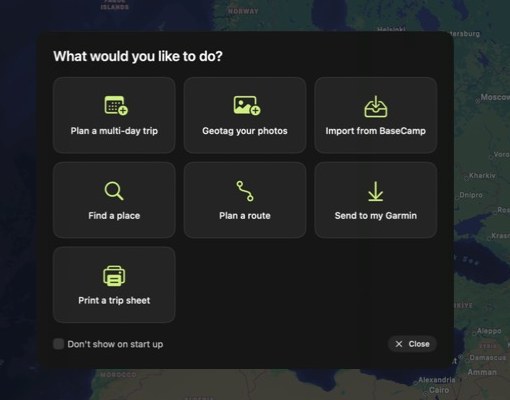
If BaseCamp is the piece you're worried about, Trailshelf is a native Mac app built to replace it. It imports your whole BaseCamp library in one step, plans road-snapped routes on Apple Maps, splits long trips into days, lets you search for fuel along the route, and sends routes to Garmin devices that mount over USB, and imports from newer MTP devices such as the DriveSmart; sending to MTP devices is in beta (tested on a DriveSmart 66). It runs natively on Apple silicon, so it doesn't depend on Rosetta.
Frequently asked questions
Is Garmin compatible with Mac?
Yes. The devices, Garmin Connect and GPX files all work on a Mac. Garmin's desktop apps, Express and BaseCamp, run on Apple silicon through Rosetta.
Does Garmin Express work on macOS 27?
Mostly. Update to Garmin Express 7.29.3 or later, which Garmin says fixes the macOS 27 install problem on Apple silicon.
Does BaseCamp work on an M-series Mac?
It still opens through Rosetta today, but it's Intel-only and Rosetta is being scaled back after macOS 27, so plan your move now.
Can I update my Garmin's maps on a Mac?
Yes, through Garmin Express. If map transfers stall, check the device afterwards to confirm the maps arrived.
Your Garmin works on a Mac. Your routes should too.
Trailshelf imports your BaseCamp library, plans routes on Apple Maps and sends them to your Garmin, natively on Apple silicon.
Try Trailshelf free for 3 daysStep-by-step guide: Send to your Garmin. All guides