You've downloaded a GPX route, or planned one on your Mac, and now you want it on your Garmin. On Windows, people reach for BaseCamp or Garmin Express. On a Mac you have three good options, and two of them need no extra software at all.
The short version
- Handhelds and older Zūmos (eTrex, GPSMAP 6x, Oregon, Montana 6xx): copy the GPX into
Garmin/NewFilesin Finder. - Edge 540/840/1040, Zūmo XT, newer watches: these use MTP, so use Garmin Connect or an MTP app like OpenMTP.
- Want it in one click? A native app like Trailshelf sends routes straight to the right folder.
Method 1: Copy the file in Finder
This works for any Garmin that shows up as a drive called GARMIN when you plug it in. If yours doesn't appear, see Garmin not showing up on your Mac first.
Connect and open the drive
Turn the Garmin on, connect it with a data cable, and open the GARMIN drive from the Finder sidebar or your desktop.
Find the right folder
Open the Garmin folder. Where the file goes depends on how you want to use it:
Garmin/
NewFiles/ ← routes, tracks, waypoints for the Saved app
GPX/ ← geocaches, and the GPX Data app
GarminDevice.xml ← tells software where this model wants files
…
On the current eTrex SE and Solar, for example, Garmin's manual says files in NewFiles become routes, tracks and waypoints in the Saved app, while files in GPX appear in a separate GPX Data app, where you can navigate them but not edit them. That model holds up to 30 files in the GPX folder. If NewFiles doesn't exist on your device, use GPX.
Copy, then eject
Drag the .gpx file into the folder. Wait for the copy to finish, then click the eject button next to GARMIN in the Finder sidebar before unplugging. The device processes new files when it disconnects or restarts, and the route appears in its route list or Saved app.
Method 2: MTP devices (Edge, Zūmo XT, newer watches)
Newer Garmins such as the Edge 540, 840 and 1040 and the Zūmo XT family connect over MTP. macOS can't show MTP devices in Finder, so Method 1 won't work. Instead:
- Garmin Connect (Edge and watches): import the GPX file as a course on the Garmin Connect website, then send it to your device and sync.
- OpenMTP: the free OpenMTP app lets you browse the device's storage on a Mac and drag files across, much like Finder.
- Zūmo XT and XT2: use OpenMTP to copy the GPX file onto the device, or the Garmin phone app that pairs with your model.
Method 3: Send it from a Mac app
If you plan routes on your Mac, a native app can skip the copy-and-paste step entirely. Trailshelf watches for Garmin drives and has a Send to my Garmin task right on its start screen:
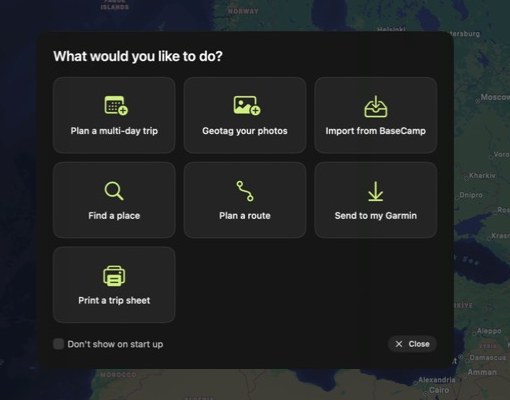
Because it reads GarminDevice.xml, Trailshelf puts files in the folder your model expects and keeps via and shaping points in Garmin's GPX format. It never replaces or deletes a file on the device: if a name is already taken, the new file is saved as “Name (2).gpx”. It works with Garmins that mount as a drive and with SD cards in a Mac card reader. Importing from newer MTP devices such as recent Zūmo and DriveSmart models works too; sending to MTP devices is in beta (tested on a DriveSmart 66), so back up the device with Garmin Express first.
Route not showing up on the device?
- Wrong folder. Try
NewFilesif you usedGPX, or the other way round. - You didn't eject. Some models only import new files after a clean disconnect or restart.
- Too many points. Older devices limit route points (often 250 per route on older handhelds). Long, detailed routes may load as a track instead, or get cut short.
- File limit reached. Delete old files from the folder if your model has a cap.
- Route vs track. A route gives turn-by-turn directions; a track is a breadcrumb line to follow. If you expected directions, make sure the file contains a route.
Frequently asked questions
Do I need BaseCamp to put GPX files on a Garmin?
No. Any Garmin that mounts as a drive accepts GPX files copied in Finder. BaseCamp only made it more convenient.
Where do GPX files go on a Garmin eTrex?
In Garmin/NewFiles for the Saved app, or Garmin/GPX for geocaches and the GPX Data app, according to Garmin's eTrex SE manual.
Can I send GPX files wirelessly?
Many newer devices can, through Garmin Connect or the Garmin phone app for your model.
Plan on your Mac. Ride with your Garmin.
Trailshelf plans routes on Apple Maps, imports your BaseCamp library and sends everything to your Garmin in one step.
Try Trailshelf free for 3 daysStep-by-step guide: Send to your Garmin. All guides