If you used Garmin GPS devices in the 2000s, you probably remember MapSource: Garmin's desktop program for planning routes, saving waypoints and sending them to your device. It came on a CD with your eTrex or GPSMAP, and for many people it was the only way to get data on and off a Garmin.
MapSource is now discontinued, and it never ran on a Mac. So if you're a Mac user looking for “MapSource for Mac”, here's what happened to it and what to use today.
What happened to MapSource?
MapSource was a Windows-only program. Garmin replaced it with BaseCamp, which runs on both Windows and Mac and opens MapSource's .gdb files. For years, BaseCamp was the answer for Mac users.
But BaseCamp has its own problem now. On Apple silicon Macs it only runs through Rosetta, Apple's translation layer for Intel apps, and Apple has said Rosetta will be scaled back after macOS 27. That leaves BaseCamp, and everyone who replaced MapSource with it, looking for another home. (More in The Rosetta deadline.)
What a MapSource replacement needs to do
- Plan routes with turn-by-turn via points, not just draw lines.
- Store and organise waypoints and tracks.
- Read and write GPX, the format every Garmin understands.
- Send data to a Garmin over USB.
- Rescue your old MapSource and BaseCamp data.
The best MapSource alternatives for Mac
| App | Type | Routes to Garmin | Old data | Price |
|---|---|---|---|---|
| Trailshelf | Native Mac app | Yes, over USB | Imports BaseCamp library and GPX | $29 once |
| Garmin BaseCamp | Intel app via Rosetta | Yes | Opens .gdb | Free |
| QMapShack | Open source | Yes, via GPX | GPX, some .gdb | Free |
| GpsPrune | Java app | GPX export | GPX | Free |
| RouteConverter | Java app | GPX export | Converts many formats | Free |
1. Trailshelf: the native Mac option
Trailshelf is a native Mac app built as a modern replacement for Garmin's desktop tools. It plans road-snapped routes on Apple Maps (driving and walking need no account or API key; cycling and truck routing use a free OpenRouteService key), imports your whole BaseCamp library (folders, lists, tracks and waypoints) in one step, and sends routes to Garmin devices that mount as a USB drive. It runs natively on Apple silicon, so there's no Rosetta deadline hanging over it.
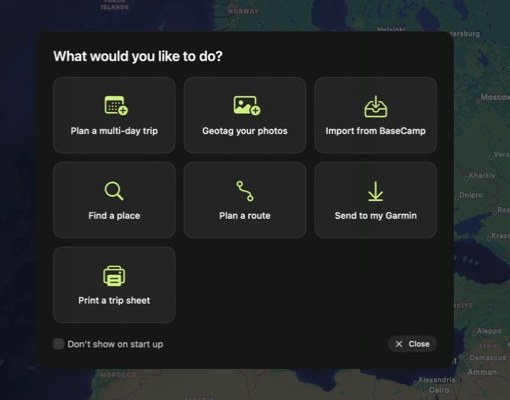
Good for: anyone who wants MapSource's “plan it on the computer, send it to the GPS” workflow in a modern Mac app. Newer MTP devices (like the Zūmo XT or DriveSmart): importing works; sending to them is in beta.
2. Garmin BaseCamp: the official successor, for now
BaseCamp is MapSource's direct replacement and still works on most Macs today. It's free and opens .gdb files. The catch is that it's an Intel-only app that hasn't seen meaningful updates in years, and it depends on Rosetta. Use it now to export your data, even if you plan to move on.
3. QMapShack: powerful and free
QMapShack is an open-source GPS app with serious route planning and map support. It's very capable, but the interface takes time to learn and it doesn't feel like a Mac app.
4. GpsPrune and RouteConverter: editing and converting
Both are free Java apps. GpsPrune is good for cleaning up and cutting tracks; RouteConverter converts between dozens of GPS formats. Neither is a full route planner for Garmin devices, but both are handy tools to keep around.
How to rescue old MapSource .gdb files
MapSource saved data in Garmin's .gdb format, which most modern apps can't open. Convert it to GPX once and you're free:
- With BaseCamp: open the
.gdbfile in BaseCamp (File → Import), then select the list and choose File → Export to save it as GPX. - With GPSBabel: the free GPSBabel tool reads Garmin
.gdbfiles and writes GPX, with no BaseCamp needed. - Then import the GPX into Trailshelf or any other app. Or let Trailshelf import your entire BaseCamp library directly if the data is already in BaseCamp.
Do it before you need it
- Export everything to GPX while BaseCamp still opens on your Mac.
- Keep the GPX files in a backed-up folder such as iCloud Drive.
- GPX is an open format, so these files will still open in ten years.
MapSource is gone. Your routes don't have to be.
Trailshelf brings your BaseCamp library and GPX files to a native Mac app, plans routes on Apple Maps and sends them to your Garmin.
Try Trailshelf free for 3 daysStep-by-step guides: Import from BaseCamp · Plan a route. All guides